Troubleshooting
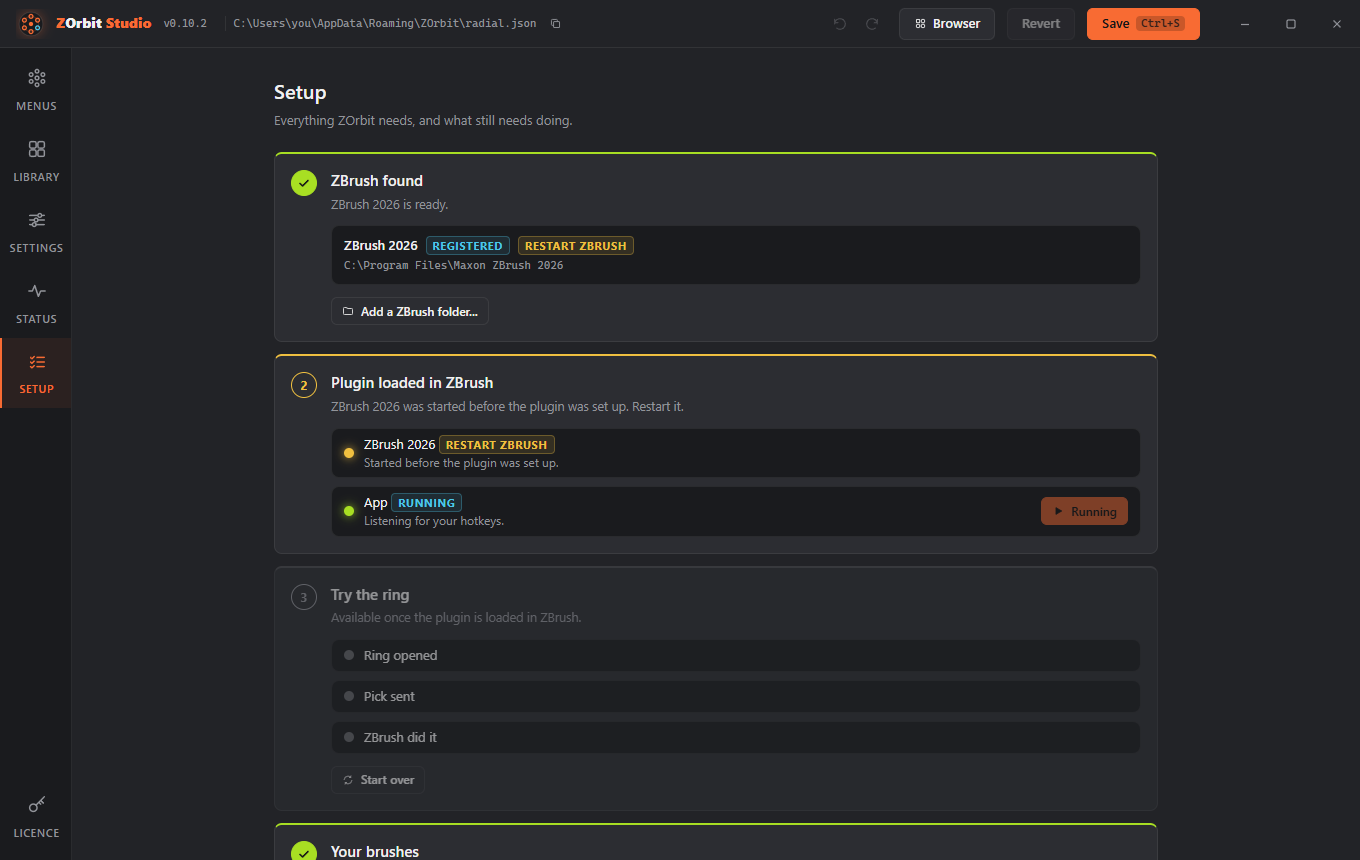
Entries are grouped by what you see. Studio's Setup screen (Alt+6) is the quickest first check: it looks at ZBrush, the plugin and the app, and says which step is missing. The log files named below are listed under Logs.
Installing
Windows protected your PC
The installer is not code-signed yet. Click More info, then Run anyway. Install and uninstall says why.
The portable version stops at startup with "Failed to resolve Python.Runtime.Loader.Initialize"
Windows marked the unzipped files as downloaded, and ZOrbit could not remove the mark, usually because it is in a folder it cannot write to. Close ZOrbit, right-click the zip, choose Properties, tick Unblock, and unzip it again into a folder of your own, such as one under Documents.
I upgraded from Radial Menu for ZBrush and F9 stopped working
The palette was renamed, so a hotkey you bound by hand to the old Apply does not carry over in ZBrush 2026. Ctrl+Alt+click Zplugin > ZOrbit > Apply, press F9, then click Preferences > Hotkeys > Store. ZBrush 2022 to 2025: update the plugin in Studio > Settings > Older ZBrush; it binds F9 itself. Your menus were copied from %APPDATA%\RadialMenu to %APPDATA%\ZOrbit on the first start, and learned auto slots from %LOCALAPPDATA%\RadialMenu. The old folders are left in place; you can delete them.
The ring does not open
Pressing the hotkey does nothing
-
Open Studio's Setup screen (Alt+6). It checks ZBrush, the plugin and the app, and says which step is missing. An amber dot on its button in the rail means a check is failing.
-
Is ZBrush the front window? The hotkey is ignored everywhere else.
- In ZBrush, open Zplugin > ZOrbit > Status. It should say the listener is verified and the app is running. If the palette is missing, ZBrush did not load the plugin. Restart ZBrush and check that your user environment variable
ZBRUSH_PLUGIN_PATH(in Windows' environment variables, user section) contains the plugin folder. As a one-off you can also loadzorbit_bridge.pywith ZScript > Python Scripting > Load. - If the status says the app is not running, press Start App, then read
app_stderr.logandradiald.log. - In Studio, check for the problems pill. A menu with no usable items, a duplicate hotkey or a hotkey the app cannot read all stop a ring from opening.
- Another program may grab the same key before it reaches the app. Try a different hotkey.
- Is ZBrush running as administrator? The app cannot read the name of an elevated program's process, so it cannot tell that ZBrush is the front window, and it ignores the hotkey.
radiald.logthen says "foreground window's process could not be read (is ZBrush running as administrator?); hotkeys ignored". Start ZBrush without "Run as administrator". - Typing is affected too. A menu hotkey is swallowed in ZBrush's text fields (a rename box, a file name), so a plain letter such as Q cannot be typed there while a menu uses it. Use a key you do not type, add a modifier, or turn off Swallow hotkey for that menu.
Picks do nothing
The ring opens, but picks do nothing
On Studio's Status screen, the listener card should say Connected. In ZBrush, Zplugin > ZOrbit > Status should say "verified". If it is not, use the fallback: bind the bridge key and leave the mode on auto. Then read bridge.log; it names each action and says whether it worked. Common causes: a press, set or toggle path that does not exist in your ZBrush (logged as "no such interface item"), or a brush, alpha, material or texture whose file ZOrbit cannot find (logged as "NOT loaded in ZBrush and no file known"). A brush you saved after ZOrbit started is found anyway: when a name is missing, ZOrbit looks through your brush, alpha, material and texture folders again before it gives up (at most once every five seconds).
ZBrush 2022 to 2025: the ring opens, but picks do nothing
Picks there only arrive through the bridge key. Hover Zplugin > ZOrbit > Apply in that ZBrush: its hotkey should match the bridge key in Studio (F9 unless you changed it). The plugin brings F9 itself, but only once it is up to date, so update it if Settings > Older ZBrush says Update available. For any other key, check that it is bound to Apply and that you clicked Preferences > Hotkeys > Store; a binding that was not stored is gone after a restart. If the palette is missing, install the plugin again in Studio > Settings > Older ZBrush and restart that ZBrush. zscript_bridge.log shows what the last pick did.
Use or test the fallback key
In ZBrush, Ctrl+Alt+click Zplugin > ZOrbit > Apply, press F9, then store it in Preferences > Hotkeys > Store. With the bridge mode on auto (the default), ZOrbit presses F9 when the listener does not answer. The rules for the key and the other modes are in How picks reach ZBrush.
To test it, set "mode": "key" temporarily, pick something, and check bridge.log for the result. Switch back to auto afterwards.
Picks feel late during a stroke
In ZBrush 2026 and newer that is intended. A pick waits until you release the mouse button or lift the pen, so a tool change never lands in the middle of a stroke. The bridge key fallback waits too: it is pressed half a second after you lift. ZBrush 2022 to 2025 cannot wait. Their plugin applies a pick as soon as the bridge key arrives, even in the middle of a stroke.
The browser
The browser does not appear
- Is ZBrush (or the browser itself) the front window? The browser hotkey is ignored everywhere else. The tray menu, Studio's Browser button and the Start menu shortcut work from anywhere.
- Does your
radial.jsonhave abrowserhotkey (new installs have Alt+B)? Check Settings > Browser. If a menu uses the same key, the menu wins and the problems pill says so. A Browser slot on a ring opens it too. - After the app starts, the browser needs a few seconds to be ready. The first press can take a moment when it was not started in advance. If it is open but you cannot see it, it may be behind other windows (Keep on top is off) or on a screen you have unplugged: press the hotkey, or open it from the tray menu.
- Read
radiald.log(lines that start withbrowser) andpopout.log. A missing WebView2 runtime stops it, as it stops Studio.
The browser is empty
The browser and the Library read the folders of a ZBrush that has run at least once. When either says ZBrush was not found, the list stays empty until ZOrbit finds one. In Studio, the Library's message has a Find ZBrush in Studio button that opens Setup. In the browser window, open Studio from the tray icon or the Start menu and go to Setup.
The browser opens but does not take the keyboard
Click the search box once. If you have to do that every time, send popout.log and the browser lines of radiald.log.
A pick in the browser does nothing
After a pick, read the toast. A toast that says Sent X to ZBrush (X is the item's name) means the app took the pick, and bridge.log says what ZBrush did with it. ZOrbit is not running. It starts and stops with ZBrush. means the browser found no app window: start ZBrush, and the app starts with it. ZOrbit did not answer. Try again in a moment. means the app's window exists but did not answer within half a second. popout.log has a line pick ... app window ..., result ... for each pick.
In radiald.log, look for pick from browser. If it says the pick was dropped because ZBrush did not get the focus back in 2 s, you are in ZBrush 2022 to 2025, which can only take a pick through the bridge key while ZBrush is the front window: do not click another program right after you pick. Check that the app is running on the Status screen if the toast says it is not.
Slots and tags
A tag slot is faint and does nothing
No installed item carries that tag, or the tag no longer exists (the problems pill says which). Tag some items in the Library, or point the slot at another tag.
My slots are not coloured by tag
Check Settings > Tag colours: the Icon tint, Glow and Band switches may all be off. Only an item's first tag colours its slot, and an item with no tag is not coloured. A change made by hand to tags.json shows within a moment.
A slot shows letters instead of a picture
There is no thumbnail for it. For a brush, that means no .zbp was found. A material with no icon in its .zmt file (some old MatCap files) and an EXR texture show it too. For other items it is the normal placeholder; set an icon to change it.
Your menus file
I broke my menus file
Studio keeps the last version as radial.json.bak. If you edit the file by hand and the app cannot read it, it keeps using the last good version and logs the error. When Studio cannot read it either, it opens on a recovery screen that shows the error with its line and column, and has these buttons:
- Open folder opens the folder that holds
radial.json. - Open logs folder opens the logs folder.
- Restore backup replaces the file with
radial.json.bak. It only appears when that file exists. - Start from defaults replaces the file with the built-in menus, after a confirmation. The unreadable file is kept as
radial.json.broken. - Try again reloads Studio, for when you have fixed the file by hand.
The rail and the Alt+1 to Alt+6 keys do nothing, and the rail is dimmed, until the file loads. Nothing is changed or saved until you choose a button.
A byte-order mark left by an editor is accepted. Deleting radial.json makes the app create a fresh one from the starter menus.
If the file cannot be read when the app starts, the app still starts: the tray icon appears, no ring opens, and radiald.log says "cannot load radial.json" with the reason. Fix the file in Studio or by hand; the app reads it again as soon as it changes. Reload menus in the tray menu logs "tray: reload failed" with the reason when the file is still unreadable.
A setting name ZOrbit does not know, such as raduis for radius in ring or itmes in a menu, is listed as a problem and ignored, with a "did you mean" when a known name is close. A swallow that is not true or false is a problem too, and counts as true. A submenu slot that points at a menu with no usable items is listed and skipped.
Checking a file from a source checkout
python zorbit\main.py --check prints every menu and lists problems without starting anything.
Logs
%LOCALAPPDATA%\ZOrbit holds radiald.log (the app), bridge.log (ZBrush side), zscript_bridge.log (ZBrush 2022 to 2025: the last pick), studio.log (how Studio started), popout.log (the browser) and app_stderr.log (crashes at startup). Studio's Status screen shows the tail of the app log and has a button that opens the folder. Files, backups and logs lists every file ZOrbit keeps.