How ZOrbit talks to ZBrush
How it works
ZOrbit has two halves.
- The app (
zorbit\) runs outside ZBrush. A keyboard hook watches for your menu hotkeys, but only while ZBrush is the front window. When one is pressed it draws the ring in a window that never takes focus, so ZBrush keeps working underneath. - The bridge (
bridge\zorbit_bridge.py) runs inside ZBrush as a Python plugin. It adds the Zplugin > ZOrbit palette, starts the app, and carries out picks by calling ZBrush's own commands.
When you pick a slot, the app writes the request to a small file and posts a Windows message to a hidden listener window the bridge keeps inside ZBrush. The bridge reads the file and does the work on ZBrush's main thread. If the listener is not available, the app can press a fallback key (F9) that you bind to Zplugin > ZOrbit > Apply.
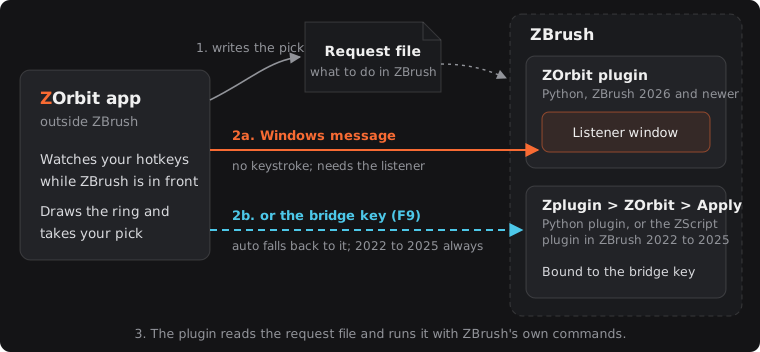
ZBrush 2022 to 2025 have no Python API, so for them the bridge is a ZScript plugin (bridge\zscript\) with the same palette. ZScript cannot host a listener window, so the app always presses the bridge key there. The app also writes each pick in a plain line-by-line form that ZScript can read, and loads brushes from that ZBrush version's own files.
The app exits when ZBrush does.
How picks reach ZBrush (bridge modes)
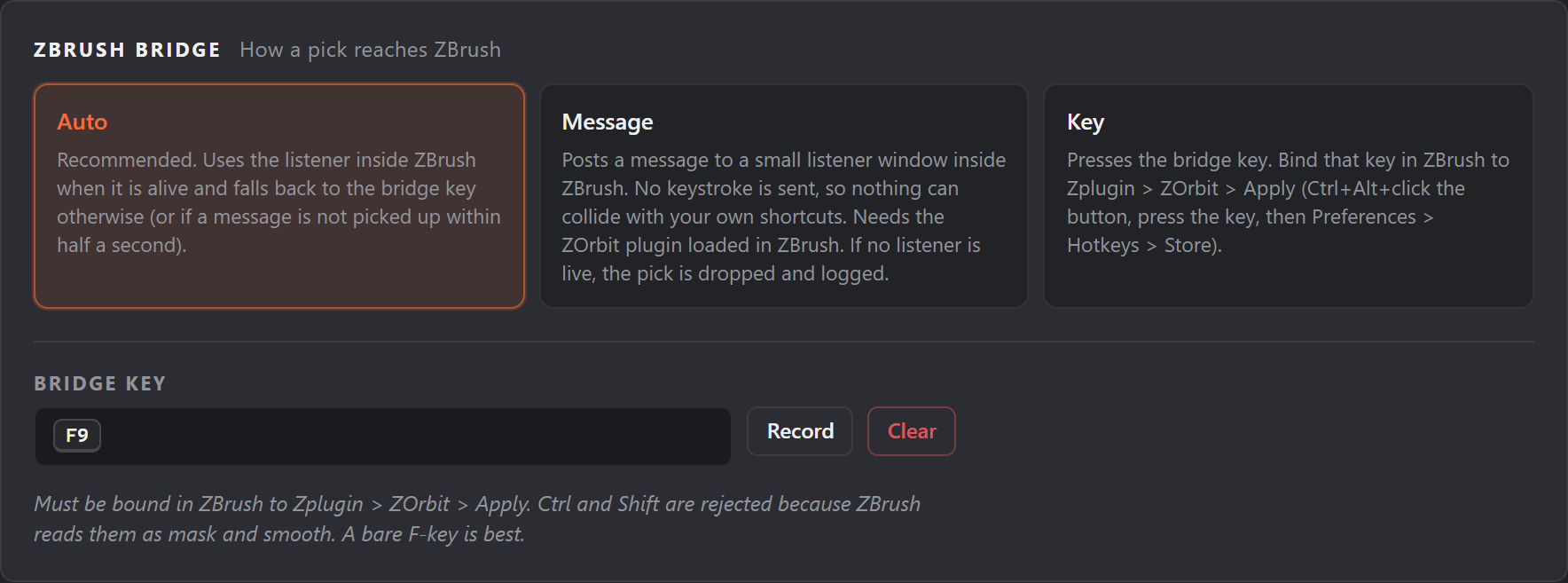
When you pick a slot, the app has to tell ZBrush. It writes the request to a file and then triggers the plugin in one of two ways. The bridge section of radial.json (and Settings > ZBrush bridge in Studio) chooses:
"bridge": {"mode": "auto", "key": "F9"}
| Mode | How it works |
|---|---|
auto (default) |
Uses the message route if the listener inside ZBrush is alive. Otherwise, or if a message is not picked up within half a second (counted from when you lift, if a stroke is going on), presses the bridge key. |
message |
Posts a window message to a hidden listener inside ZBrush. No keystroke is sent, so nothing can collide with your own shortcuts. If the listener is not available, the pick is dropped and logged. |
key |
Presses the bridge key every time. |
The message route needs nothing from you. It works once the plugin has loaded and its listener is verified (see Zplugin > ZOrbit > Status).
The bridge key is the fallback. To set it up:
- In ZBrush, Ctrl+Alt+click Zplugin > ZOrbit > Apply.
- Press the key you want, such as F9.
- Open Preferences > Hotkeys and click Store.
Rules for the bridge key: use a bare F-key if you can (Alt combinations are allowed). Ctrl and Shift are rejected, because ZBrush reads them as mask and smooth. The app only presses the key while ZBrush is the front window, and releases any modifiers you are holding first.
If radial.json has no bridge.key, or an empty one, the key is F9. A key ZOrbit cannot use (one with Ctrl or Shift, or one it does not understand) is listed as a problem and F9 is used instead.
In ZBrush 2026 and newer, a pick that arrives while you are in the middle of a stroke (mouse button down) waits until you lift. That holds for both routes: the plugin holds a message back until the button is up, the app does not fall back to the bridge key while the button is down, and Apply waits the same way if it is run mid-stroke. The fallback key is pressed half a second after you lift, if the message still has not been picked up. ZBrush 2022 to 2025 cannot wait: the ZScript plugin applies a pick the moment the key arrives, even in the middle of a stroke. Right after a pick the app also makes a zero-distance mouse move, which wakes ZBrush's cursor and pen tracking.
ZBrush 2022 to 2025
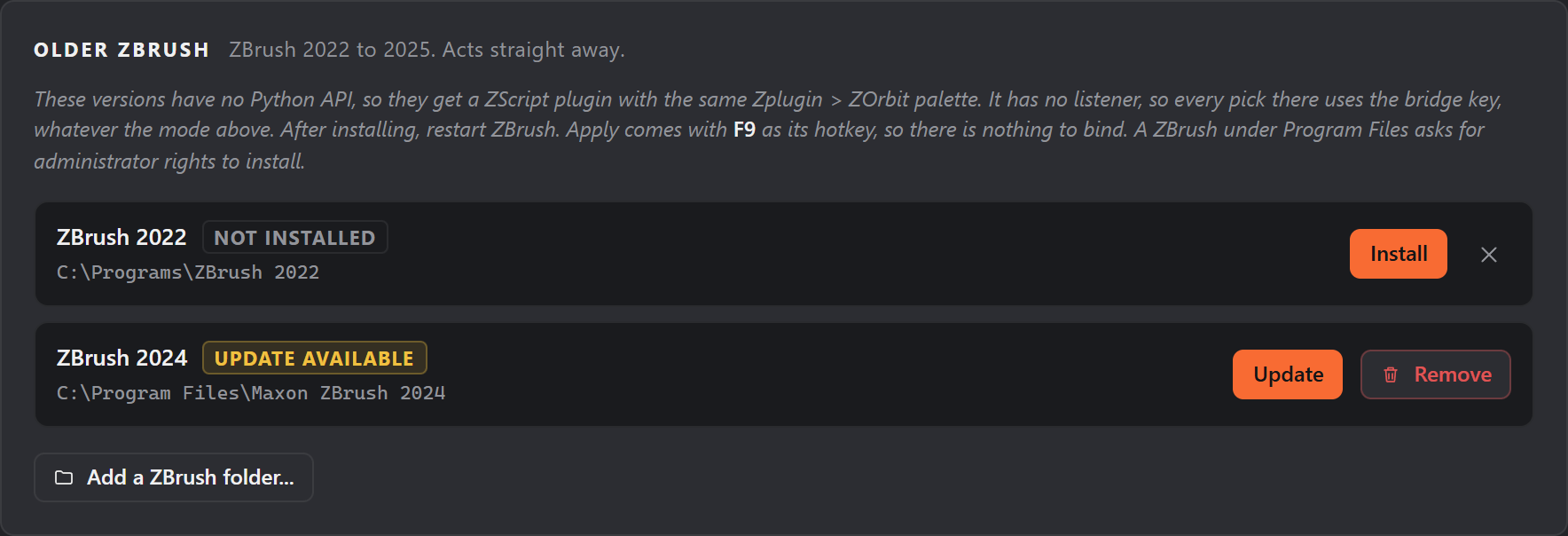
These versions have no Python API, so they get a ZScript plugin with the same palette. Studio installs it (the steps are in Install and uninstall): Settings > Older ZBrush lists the 2022 to 2025 versions it found, with Install, Update and Remove for each, and Add a ZBrush folder for one it missed (a folder you added can be forgotten again with the x next to it). The plugin goes into that ZBrush's ZStartup\ZPlugs64 (the only place these versions load plugins from), together with a ZOrbitData folder. A ZBrush under Program Files asks for administrator rights: the row says "approve the prompt" while Windows waits for you, for up to five minutes. The elevated step checks that the destination is a ZBrush plugin folder and builds the plugin files from the installation's own copies, so nothing from a user-writable folder is copied with administrator rights.
Differences from ZBrush 2026 and newer:
- There is no listener, so every pick uses the bridge key, whatever the mode. The plugin binds F9 to Apply itself, so the default key needs no setup. If you choose another bridge key, bind and store it in each of these versions (the steps in How picks reach ZBrush); each version keeps its own hotkeys.
- A pick does not wait for the end of a stroke (see above).
- Brushes load from that version's own
.zbpfiles, because an older ZBrush cannot always read a newer version's brushes. - Status shows where picks arrive, whether one is waiting, and the last pick. The plugin also writes that last pick to
zscript_bridge.log, which Studio's Status screen shows.
When this version of ZOrbit has a newer plugin than one you installed, Settings shows a badge and that row says Update available. After Update, restart that ZBrush.
The Zplugin > ZOrbit palette
| Button | What it does |
|---|---|
| Studio | Opens ZOrbit Studio. |
| Apply | Carries out the pending pick. Bound to the bridge key for the fallback route. In ZBrush 2022 to 2025 it comes with F9 already bound. |
| Start App | Starts the app if it is not running. Normally unnecessary. |
| Status | Shows whether the listener is verified, whether the app is running, and the last pick. |