Appearance
Appearance and behaviour settings
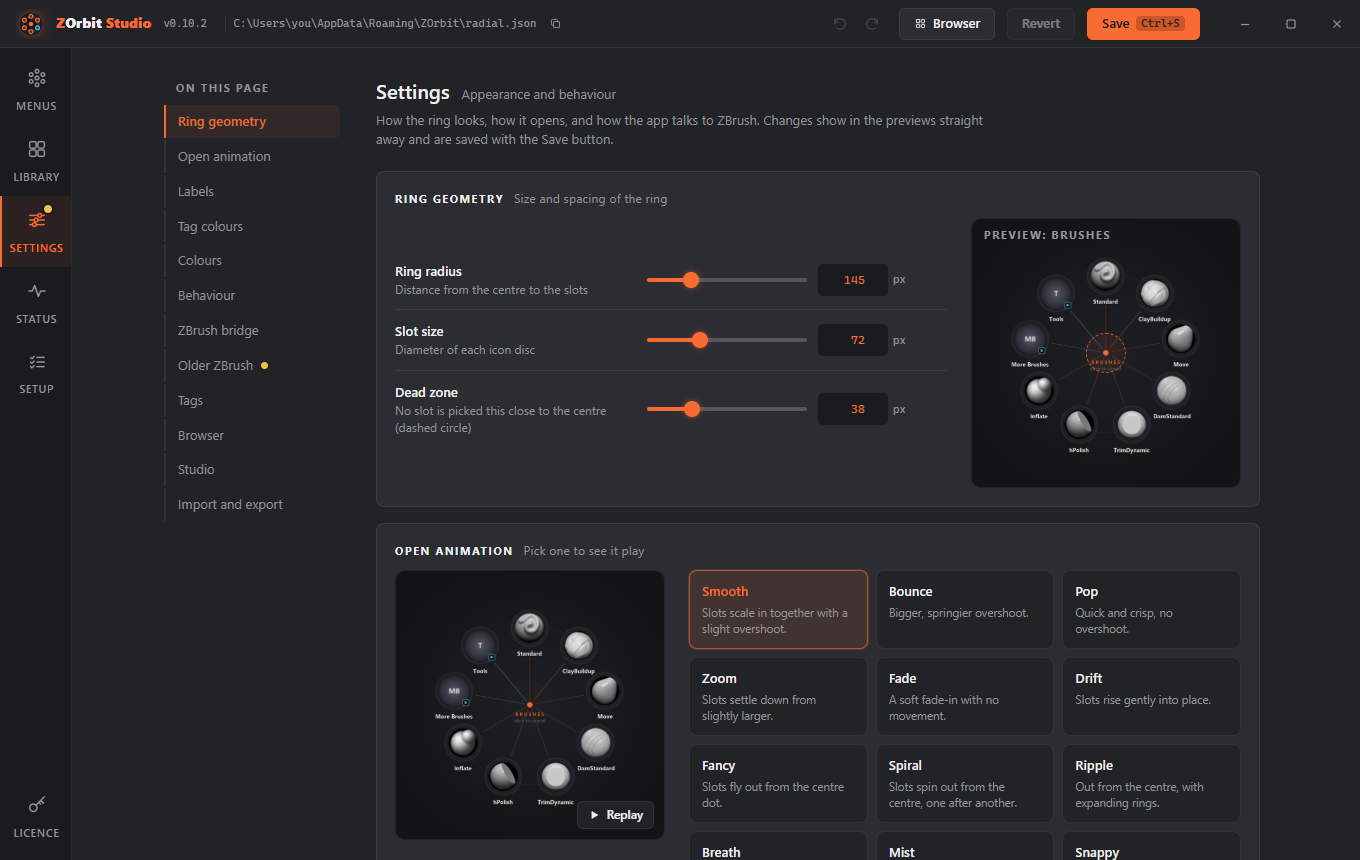
These are on the Settings screen in Studio, and under "ring" in radial.json. Studio shows live previews.
Setting (ring.) |
Default | Range | Meaning |
|---|---|---|---|
radius |
145 | 60 to 400 | Distance from the centre to the slots, in pixels. |
slot |
72 | 32 to 160 | Diameter of each icon disc. |
dead_zone |
38 | 10 to 120 | Radius around the centre where no slot is picked. |
tap_ms |
250 | 0 to 1000 | A hotkey press shorter than this is a tap. |
timeout_s |
20 | 2 to 120 | An open ring closes itself after this many seconds. |
animation |
smooth |
see Open animations | The open animation. |
labels |
name |
name, none |
Show names under the slots, or icons only. |
flick |
true |
true, false |
Moving out past a slot picks it without releasing or clicking. |
hover_submenus |
true |
true, false |
Reaching a submenu slot opens the submenu, centred on that slot. |
tag_colors |
tint |
none, tint, glow, both |
Whether an item's first tag tints its icon, glows, or both. See Tag colours. |
tag_band |
medium |
none, hairline, narrow, medium, wide |
Thickness of the band through the slot centres. none turns it off. |
tag_band_opacity |
0.45 | 0 to 1 | How solid the band is. |
tag_glow_opacity |
0.4 | 0 to 1 | Strength of the halo. |
tag_tint_opacity |
0.3 | 0 to 1 | Strength of the tag colour laid over the icon. |
tag_tint_style |
gradient |
flat, gradient |
gradient is stronger towards the rim. |
tag_tint_blend |
multiply |
multiply, overlay |
multiply darkens the icon. overlay keeps its light and shade. |
Sizes are scaled for high-DPI screens automatically.
Colours
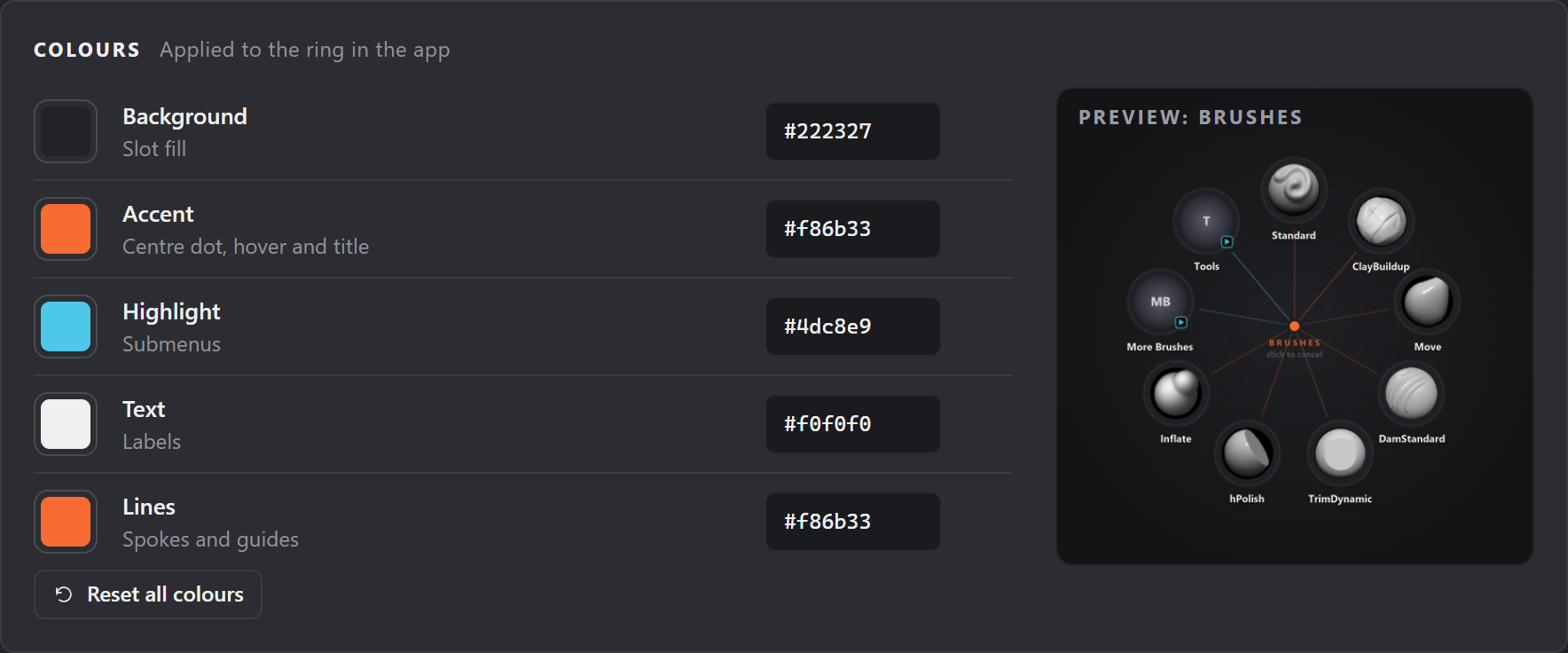
ring.colors takes #rrggbb values:
| Colour | Default | Used for |
|---|---|---|
bg |
#222327 |
Slot fill |
accent |
#f86b33 |
Centre dot, hover, title |
highlight |
#4dc8e9 |
Submenu slots and badges |
text |
#f0f0f0 |
Labels |
lines |
#f86b33 |
Spokes and guide circles |
"ring": {
  "radius": 160,
  "animation": "spiral",
  "colors": {"accent": "#7bd88f", "lines": "#7bd88f"}
}
Anything you leave out keeps its default. Values outside the allowed range are reported as problems and the default is used. In Studio, a slider or switch put back to its default is taken out of the file again, so it counts as no change.
Tag colours
The colour of an item's first tag (see Tags) can show on its slot in three ways: an icon tint, a glow and a band. In Studio they are the three groups of the Tag colours card on the Settings screen, each with its own switch. Beside them is a preview. It shows the current menu if it has a tagged brush, and otherwise a sample ring of your brushes coloured with your tags, so every change is visible.
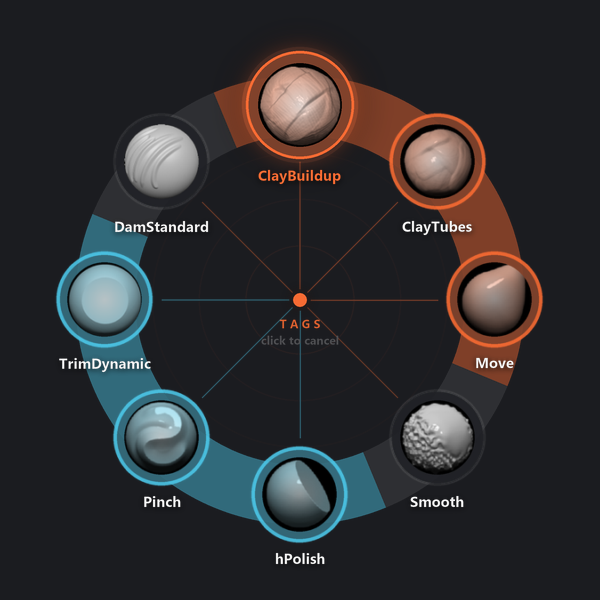
- Icon tint is a rim in the tag colour, and the tag colour laid over the brush icon. Opacity (
tag_tint_opacity, 0 to 1, default 0.3) sets how strong it is. Style (tag_tint_style) isflat, orgradient(the default), which is stronger towards the rim. Blend (tag_tint_blend) ismultiply(the default, Darken in Studio), which darkens the icon, oroverlay(Keep highlights), which keeps its light and shade. - Glow is a soft halo in the tag colour around the slot. Opacity (
tag_glow_opacity, 0 to 1, default 0.4) sets how strong it is. - Band is a strip through the slot centres. Each slot's stretch of it is in its tag colour, an untagged slot gets a faint grey stretch, and a ring with no tagged slots has no band. Thickness (
tag_band) ishairline,narrow,medium(the default) orwide, ornoneto turn the band off. Opacity (tag_band_opacity, 0 to 1, default 0.45) sets how solid it is.
The tint and glow switches together set ring.tag_colors. The band switch sets tag_band to none, or back to its thickness.
tag_colors |
What you see |
|---|---|
none |
Neither tint nor glow. |
tint |
The icon tint. The default. |
glow |
The glow. |
both |
The tint and the glow together. |
The band does not depend on tag_colors. Slot colours are dropped entirely, hover border, spoke, label and band included, only when tag_colors is none and tag_band is none. The fan of a tag slot is always drawn in that tag's colour, and so is the slot itself. Items without a tag look as before. The colours are drawn when the ring opens, so they cost no speed.
In Studio, opacities show as percentages (45%) but are 0 to 1 in the file. Controls under a switch that is off are dimmed.
"ring": {
  "tag_colors": "both",
  "tag_band": "narrow",
  "tag_tint_opacity": 0.4,
  "tag_tint_style": "flat"
}
Browser hotkey
"browser": {"hotkey": "Alt+B"}
The hotkey that opens the browser window and, pressed over it, hands the keyboard back to ZBrush. On Settings it is the Browser card, where you record it like a menu hotkey and Studio warns if a menu already uses it. New installs get Alt+B. An existing radial.json has no browser section until you add one, so the hotkey does nothing there. Leave it out for no hotkey; the browser then opens from Browser slots only.
Open animations
Set ring.animation (or pick one in Studio, which plays a preview). Closing is always instant, so a pick never waits for an animation.
Any menu or submenu can use a different one: give it its own animation, or pick one under Open animation in its menu settings in Studio. Menus without one use ring.animation.
"more": {
  "title": "More Brushes",
  "animation": "spiral",
  "items": [ ... ]
}
| Mode | What you see |
|---|---|
smooth |
Slots scale in together with a slight overshoot. The default. |
bounce |
A bigger, springier overshoot. |
pop |
Quick and crisp, no overshoot. |
zoom |
Slots settle down from slightly larger. |
fade |
A soft fade-in with no movement. |
drift |
Slots rise gently into place. |
fancy |
Slots fly out from the centre dot. |
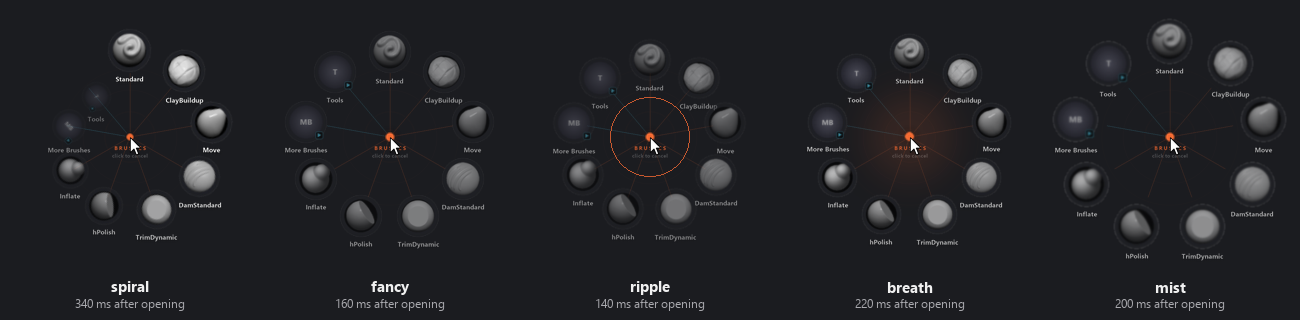
spiral |
Slots spin out from the centre, one after another, clockwise. |
ripple |
Slots move out from the centre while rings expand from the dot. |
breath |
A soft halo grows behind the dot as the slots ease out. |
mist |
Slots sharpen in from beyond their seats. |
snappy |
No animation. The ring appears instantly. |
Only spiral staggers its slots; every other mode animates all slots at the same time.
Frames from a few modes, partway through opening: